
Live
Run the service, keep everyone in sync
Once a service is published, run it from a live control screen — and let the team follow along on a program view that updates itself.
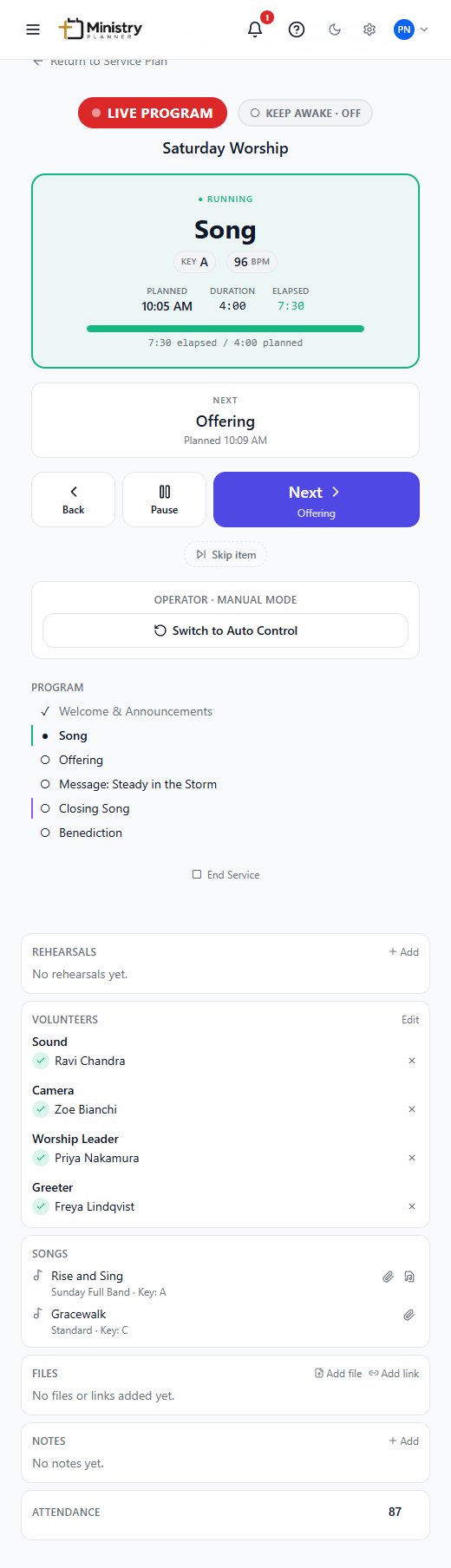
The plan, running in real time
The run sheet you built during the week doesn't need re-typing into a separate cue sheet on Sunday. Live runs that same plan — advancing automatically on schedule, or handed over to manual control the moment something changes.
What you can do
- Let a published service advance through its run sheet automatically, on schedule, with no operator needed.
- Take manual control at any point — advance, go back, pause, or skip an item without deleting it from the plan.
- Keep a screen awake on the device running the service, so the control screen doesn't lock mid-service.
- Share a program view that shows the current and next item, and updates on its own as the service runs.
- Keep a record afterward of what was actually skipped or ran long, separate from the original plan.
Live is built for Services today — Gatherings (meetings, classes, and small groups) don't yet have a live control view of their own.
Related
- ServicesBuild the run sheet, assign roles, and run the service live.
- PeopleEveryone's contact details, ministry involvement, and availability.
- SongsOne song library, with keys, arrangements, and chord charts.
- TeamsDepartments, divisions, roles, and reusable serving teams.
- Files & MediaAttach the files and links a plan actually needs, right where they're used.
- ReportsAttendance, songs, and volunteer load, without a spreadsheet.